The tools I had been using
For work I had mostly used Adobe's Premiere Pro and After Effects. For this round of music releases, I decided to build a video editor with a feature set trimmed down to what I personally need, and to make the music videos in that.
What bothered me about full-featured software
I did not use the Adobe tools often enough, so every time I opened one I had to go hunting for the function I wanted. That hunting was the stressful part.
Having many features is useful in itself. But if all you are doing is making a music video, you can finish it without touching roughly ninety per cent of them.
What I tried first
When I started out I experimented with lyric videos (music videos where the words animate along with the song), motion graphics, and footage leaning heavily on effects.
The trouble is that pushing the technical polish of a video means watching the same few seconds over and over to check it. Partly because of my age, my eyes would tire and I frequently could not keep reviewing.
Why I changed direction
There is already a great deal of video like that out there. And I judged that, in my case, spending long stretches producing high-gloss footage was not something I could sustain.
When I looked back at the videos I actually enjoy watching, they were the kind you can gaze at vaguely before sleep — very little movement. Some people will find simple, near-static footage lacking, and I decided I did not need to aim at them. So I narrowed my audience to people who like video with few scene changes.
Working out which features I need
Once the direction was settled, the required features narrowed too. Deep layer stacks are barely necessary. Laying video clips in order along a plot decided in advance, and adjusting their timing to the music, is enough. This approach cuts production time dramatically.
The aspect ratio problem
The other issue was the difference between the aspect ratios YouTube and Instagram prefer. YouTube wants 16:9 landscape, Instagram 9:16 portrait, so each needs its own cut.
I considered rotating the 16:9 footage ninety degrees for Instagram, but it did not suit my taste, so I dropped it. Posting the 16:9 version to Instagram as-is only adds black bars top and bottom, which causes no practical problem — but that did not suit me either, so I set it aside.
MV Train Creator, built in-house
For all those reasons I decided to build a video editor dedicated to making music videos. It is called MV Train Creator.
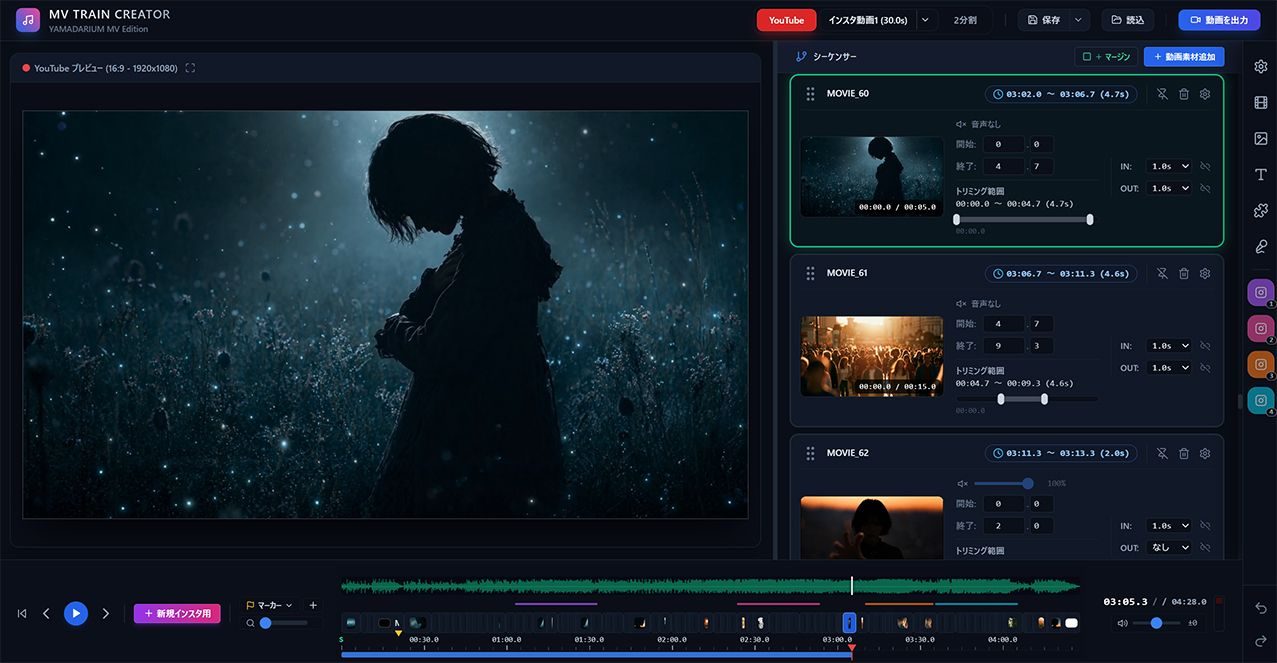
Its main features are editing while previewing the YouTube and Instagram cuts side by side, and displaying lyrics in time with the song.
Right now I am adding features as I need them while actually producing music videos, and checking how it feels to use. So far I have implemented gamma correction, colour correction, reverse playback and slow playback — the minimum I thought worth having.
What comes next
Once debugging and the rest are done, I plan to release it on the Microsoft Store. When it is ready I will put up an introduction page here on the site.